Data Science workflow
In very simple words to build recommendation service it is required to get some data about user and items, build model from it based on some algorithm and then serve recommendations back to user based on this model.
In PEACH there are several components which are supposed to simplify and automate the process of building recommendations:
- Collect API and proposed data format for broadcasters to integrate in their products to send data to PEACH
- PEACH Lab - web-based interactive development environment ready to be used by data scientists based on Jupyter Lab
- Git repositories in EBU GitLab to share the code and ideas between engineers from different members
- Schedulers for tasks and api endpoints to rollout the algorithms to production
- Recommendation API to serve results back to the users by broadcasters products
- Dashboards and A/B tests to iterate on algorithms and monitor its performance
PEACH Lab
PEACH Lab is our packaging of Jupyter Lab with additional extensions and libraries.
It provides:
- ready to use Python 3 environment with common libraries preinstalled
- integration with EBU GitLab and an extension to perform common git operations
- Configured with access to the data stored in S3, Druid, Milvus, Codex (MongoDB), influxDB, Redis, Kafka, etc...
- GitLab repo with example and tutorials to help users learn the platform
- pipe-algorithms-lib with useful utilities and common functions
- Useful notebooks to visualize state of tasks/endpoints in production
- Template for new projects to start with
Tasks
Many recommendation algorithms contain a part which needs to be recomputed as new data (usually user-item interaction events or new items) becomes available. Having implemented such part, one can create a task which will run periodically recomputing the model. Such periodic automatic execution could also be useful for time series metrics computation for the dashboard.
Tasks typically load data from databases (Druid, Milvus, InfluxDB, MongoDB) and/or from S3 / Redis / Kafka, make calculations and store the result of computations (for instance matrix representing user etc) into Redis.
Recommendation API (also called endpoints)
After recommendation model is built by the task it can be used to serve recommendations based on some set of input parameters, for example, user ID or item ID.
Recommendation API is HTTP REST API where it is possible to define custom function and attach it to specific url.
In a typical use case inside this function recommendation model will be loaded from Redis and will be transformed to a set of recommended items for corresponding values of input parameters. Afterwards some Business Rules can be applied to the results and it is served back as JSON.
Performance is a critical requirement for the vast majority of endpoints. An endpoint which talks to S3 / MongoDB / Milvus / InfluxDB doesn't meet this performance requirement, this is why endpoints should rely on Redis and/or Druid instead.
Going to Production
Both Tasks and Endpoints are defined declaratively using PEACH configuration files.
This configuration together with notebooks and code should be pushed to GitLab repositories.
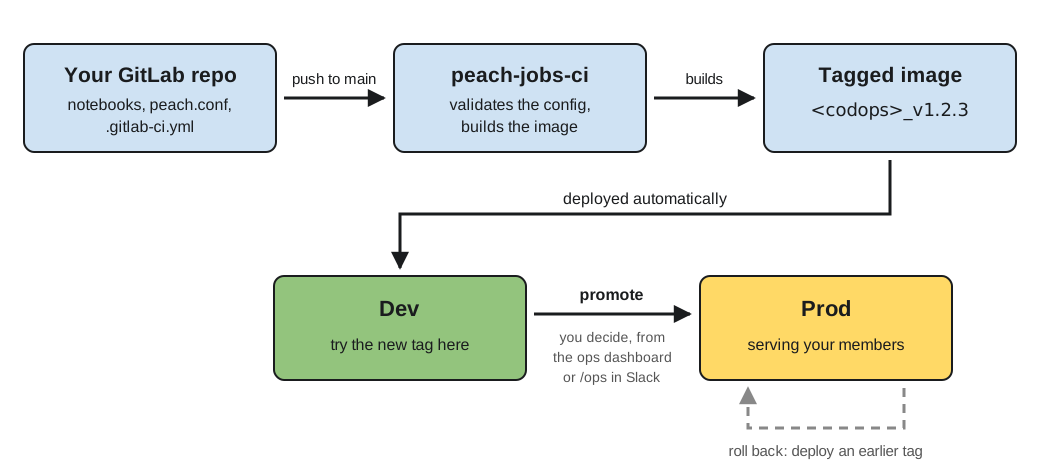
The mechanics are covered in two dedicated pages:
- Setting up your repository — wiring
.gitlab-ci.ymlto the build, what a push builds, and publishing your own Python package with semantic commit messages. - Promotion and rollback — lifting a tag from dev to production, and rolling back.
In short: a push to your default branch validates your peach.conf, builds
a tagged image and deploys it to your codops' dev environment; promoting
that tag to production is a deliberate, human action.
As soon as Git is used to track algorihms and configurations users can benefit from well-known features such as:
- Git Feature Branches workflow - proceed with your work in separate branch and merge it to master when you are ready
- Versioning - Algorithms are versioned by git commit ids
- Collaboration - Give access to GitLab repositries to colleagues to work together
- Code reviews - Ask a colleague or memeber of PEACH core team to review the changes before going to production
Where to go next
- Start exploring with Getting Started for PEACH Lab
- Read about Algorithms and Business Rules
- Tutorials repository
- Tasks Tutorial to understand what is Task scheduler and how it schedules tasks
- Check Recommndation API Tutorial to learn more about things like A/B tests, fallbacks, etc.